
Wi-Fi 7 and 6GHz Wall Attenuation: Is a 6GHz Router Worth It?
The marquee selling point of Wi-Fi 7 and Wi-Fi 6E is the newly unlocked 6 GHz spectrum with massive 320 MHz channels and theoretical speeds surpassing 10 Gbps. But in real homes, penetration through walls is what makes or breaks connectivity. How does 6 GHz actually behave across residential walls? Here is the calculable physics behind it.
Why does 6GHz lose signal faster through walls?
The core electromagnetic rule is straightforward: higher frequencies mean shorter wavelengths, which suffer greater absorption inside dense materials and weaker diffraction around edges.
At 2.4 GHz, the 12.5 cm wavelength bends well through doorway gaps. At 5 GHz, wavelength shrinks to 5.8 cm. At 6 GHz (5.925–7.125 GHz), the 5.0 cm wavelength is heavily absorbed by drywall, brick and reinforced concrete, casting pronounced RF dead zones.
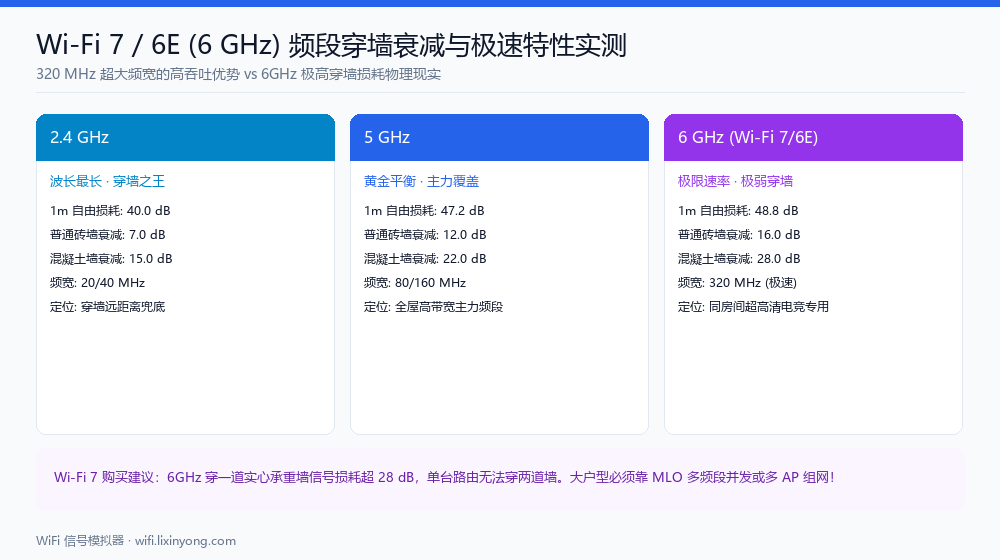
2.4GHz vs 5GHz vs 6GHz comparison table
Using the ITU-R P.1238 indoor propagation model at 20 dBm transmit power:
| Parameter | 2.4 GHz | 5 GHz | 6 GHz (Wi-Fi 7/6E) |
|---|---|---|---|
| Wavelength | ≈ 12.5 cm | ≈ 5.8 cm | ≈ 5.0 cm |
| 1 m reference loss | 40.0 dB | 47.2 dB | 48.8 dB (highest base loss) |
| Through a wooden door | ≈ 3.0 dB | ≈ 4.5 dB | ≈ 6.0 dB |
| Through a brick wall | ≈ 7.0 dB | ≈ 10.0 dB | ≈ 16.0 dB (more than double) |
| Through concrete shear wall | ≈ 17.0 dB | ≈ 25.0 dB | ≈ 28.0–32.0 dB (near dead zone) |
| Maximum channel width | 40 MHz | 160 MHz | 320 MHz (massive throughput) |
| Theoretical PHY peak | ≈ 574 Mbps | ≈ 2402 Mbps | ≈ 5764 Mbps |
A single brick wall costs 16 dB at 6 GHz. That means passing through one brick wall at 6 GHz causes the same signal loss as passing through two walls at 5 GHz.
What happens through a reinforced concrete wall?
Consider a high-end Wi-Fi 7 AP radiating at 23 dBm:
At a 6-metre distance, free space loss accounts for about 60 dB; passing perpendicularly through a concrete wall adds 28 dB loss.
Received signal at the device drops to: 23 − 60 − 28 = −65 dBm. If the angle is oblique or the wall contains steel rebar mesh, loss exceeds 32 dB, plunging RSSI below −75 dBm.
At −75 dBm, 4096-QAM and 320 MHz bandwidth drop back to narrow channels, wiping out the speed advantage.
Can MLO save 6GHz coverage?
Wi-Fi 7 introduces MLO (Multi-Link Operation), allowing compatible clients to transmit and receive concurrently across 2.4 GHz, 5 GHz and 6 GHz bands.
In the same room, you get multi-gigabit throughput on 6 GHz. When you step behind a concrete wall and 6 GHz drops out, MLO seamlessly fails over to 5 GHz or 2.4 GHz without interrupting video calls or gaming sessions.
MLO solves the disconnect penalty, but it cannot alter the physics: 6 GHz remains a single-room throughput booster.
Deployment recommendations
- A single Wi-Fi 7 router only covers open spaces: up to 70 m² studio or open-plan living rooms benefit most from 6 GHz.
- Multi-room homes require distributed APs: for homes over 100 m², pair Wi-Fi 7 with wired backhaul mesh or PoE in-wall APs so every key room has direct line-of-sight coverage.
- Regional spectrum differences: verify whether 6 GHz is licensed for unlicensed indoor use in your country before buying imported hardware.
Step by step
- Draw your floor plan:Trace your exterior and partition walls, tick load-bearing walls, and place an AP.
- Simulate on 5 GHz:Select 5 GHz in the Radio Parameters panel and run simulation to record the green coverage percentage.
- Switch to 6 GHz:Select 6 GHz (Wi-Fi 6E/7) from the dropdown and watch the coverage area contract behind partition walls.
- Add secondary nodes:Place additional AP nodes in weak rooms and re-simulate to achieve seamless high-speed coverage.
FAQ
Related guides
Try it on your own floor plan
Draw your layout, place a router and see whole-home coverage in seconds. Free, no signup, nothing leaves your device.
