
Best Router Placement: 4 Common Spots Compared
There is no universal answer to where a router should go — it depends on where your walls are. The same router in a good spot versus a bad one can differ by more than 15 dB in the far bedroom, which is the difference between full speed and a dropped connection.
Three rules: centre, avoid walls, raise it
These are in priority order. When they conflict, protect "avoid walls" first.
- Centre it on the area you need to cover, not on the building footprint. If the balcony and storage room do not need WiFi, exclude them before finding the centre.
- Avoid walls on the paths to your main rooms, especially reinforced concrete. One load-bearing concrete wall costs 17 dB at 2.4 GHz.
- Raise it to 1.2–1.8 m, with half a metre of clearance from metal and bulky furniture. On the floor, a large share of the energy is absorbed by furniture and ground reflections.
Four common positions compared
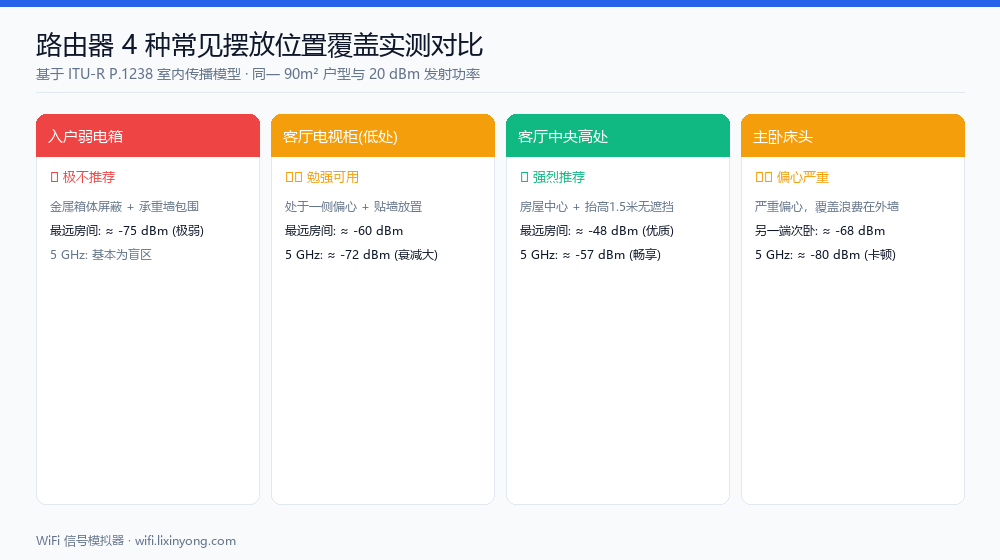
A 90 m² two-bedroom flat, 20 dBm transmit power, measured at the far bedroom corner. These are model estimates for comparing relative merit, not absolute field measurements.
| Position | Main problem | Far room 2.4 GHz | Far room 5 GHz |
|---|---|---|---|
| Structured wiring box | Metal enclosure, boxed in by load-bearing walls, 2–3 walls to cross | ≈ −75 dBm (marginal) | Mostly dead |
| Media cabinet (low, against wall) | Off-centre, against a wall, furniture in the way | ≈ −60 dBm | ≈ −72 dBm |
| Mid-living-room, elevated | Almost none — recommended | ≈ −48 dBm | ≈ −57 dBm |
| Master bedroom nightstand | Badly off-centre, many walls to the far end | ≈ −68 dBm | ≈ −80 dBm |
Why the wiring box is almost always the worst spot
In new builds every Ethernet run terminates in the structured wiring box, so the router ends up living inside it. Three problems stack up: the enclosure is usually metal, which acts as a shield around the antennas; the box sits in a corner near the entrance, so it is inherently off-centre; and the entrance and party walls around it are typically reinforced concrete.
The signal is attenuated twice before it even leaves the hallway. If the cabling is already fixed, keep only the ONT and a switch in the box and run one Ethernet cable to an AP in the middle of the living room. That single cable usually beats buying a more expensive router.
Distance or walls — which matters more?
This is the question worth getting right. The answer: walls matter far more than distance.
| Scenario | Received strength | Equivalent free-space distance |
|---|---|---|
| 8 m, clear line of sight | −45.3 dBm | 8 m |
| 8 m, through a wooden door (3 dB) | −48.3 dBm | ≈ 10 m |
| 8 m, through a brick wall (7 dB) | −52.3 dBm | ≈ 14 m |
| 8 m, through a concrete load-bearing wall (17 dB) | −62.3 dBm | ≈ 32 m |
That last row is the point: one concrete load-bearing wall is equivalent to stretching 8 metres out to 32 metres. Routing around a single load-bearing wall usually pays off more than moving two or three metres closer. Count the walls on the path first, then worry about distance.
Test it against your own floor plan
Rules only point you in a direction; the specifics depend on your walls. Draw your layout in the WiFi Signal Simulator, then drag the router while the simulation is running — the heatmap updates live, so comparing two candidate spots takes seconds.
Step by step
- Draw the floor plan:Use Draw Walls to trace the outline wall by wall, pick a material for each and tick load-bearing where it applies. You can also load a studio or two-bedroom template and edit it.
- Place the router:Switch to Place APs and drop one access point at your first candidate position.
- Run the simulation:Save the layout, then hit Simulate to get the RSSI heatmap and the coverage share for each quality band.
- Drag and compare:While simulating, drag the AP to another candidate spot and watch the "Excellent" share change. Keep the position with the highest share.
FAQ
Related guides
Try it on your own floor plan
Draw your layout, place a router and see whole-home coverage in seconds. Free, no signup, nothing leaves your device.
