
2.4GHz vs 5GHz WiFi: Which Band Should You Use?
The trade-off fits in one line: 2.4 GHz travels further but is slower and more crowded, 5 GHz is faster but poor through walls. What actually matters is by how much — 3 dB you can ignore, 20 dB forces a different plan.
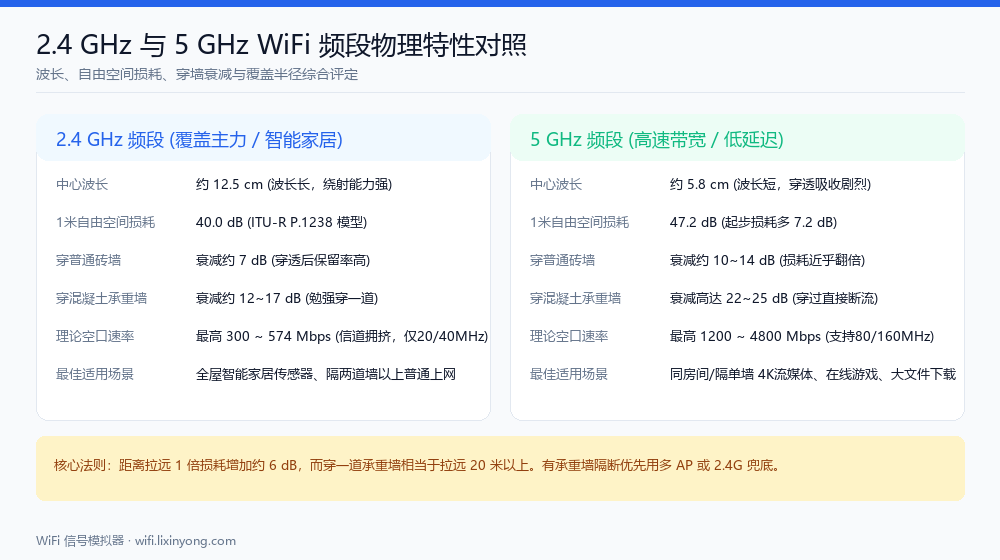
The core differences
| Item | 2.4 GHz | 5 GHz |
|---|---|---|
| Reference loss at 1 m | 40 dB | 47.2 dB |
| Indoor path loss exponent n | 2.8 | 3.0 |
| Through a wooden door | ≈ 3 dB | ≈ 4.5 dB |
| Through a brick wall | ≈ 7 dB | ≈ 10 dB |
| Through a concrete load-bearing wall | ≈ 17 dB | ≈ 25 dB |
| Through a concrete slab | ≈ 18 dB | ≈ 25 dB |
| Non-overlapping channels | 3 (1/6/11) | Usually 5+ |
| Typical interference | Bluetooth, microwaves, neighbours | Much less |
| Peak throughput | Lower | Higher |
Look at the first two rows — they explain why 5 GHz is already behind before it passes through anything. The 1 m reference loss alone differs by 7.2 dB. That gap is set by wavelength, not by how good your router is.
How much does coverage radius differ in the open?
Both at 20 dBm transmit power with clear line of sight:
| Distance | 2.4 GHz | 5 GHz | Difference |
|---|---|---|---|
| 1 m | −20.0 dBm | −27.2 dBm | 7.2 dB |
| 5 m | −39.6 dBm | −48.2 dBm | 8.6 dB |
| 10 m | −48.0 dBm | −57.2 dBm | 9.2 dB |
| 20 m | −56.4 dBm | −66.2 dBm | 9.8 dB |
Taking −65 dBm as the "comfortably usable" boundary, 2.4 GHz reaches roughly 40 m in the open while 5 GHz manages about 18 m — the usable radius is roughly halved. Add walls and the gap widens further, because 5 GHz also loses more per wall.
The gap once walls are involved
Same 8 m distance, now with obstructions:
| Obstruction | 2.4 GHz | 5 GHz | Difference |
|---|---|---|---|
| None | −45.3 dBm | −54.3 dBm | 9.0 dB |
| 1 brick wall | −52.3 dBm | −64.3 dBm | 12.0 dB |
| 1 concrete load-bearing wall | −62.3 dBm | −79.3 dBm | 17.0 dB |
| 2 brick walls | −59.3 dBm | −74.3 dBm | 15.0 dB |
One load-bearing wall opens a 17 dB gap between the bands. That is why 5 GHz feels blazing in the living room and worse than 2.4 GHz in the bedroom — it is physics, not a router defect.
So which should you use?
Prefer 5 GHz when
The device is in the same room or open space as the router; you need high throughput (4K streaming, large transfers, low-latency gaming); or the 2.4 GHz band in your building is saturated with neighbouring networks.
Keep 2.4 GHz for
Smart home gear (most plugs, bulbs and sensors are 2.4 GHz only); rooms more than two walls away; and edge locations like the yard, basement or garage.
Should you merge both bands into one SSID?
For most homes, yes — modern clients roam well enough and it saves hassle. Split them into separate SSIDs if you have older smart home devices that fail to join, or if you notice phones clinging to 5 GHz in weak-signal areas.
Compare it yourself
Switch bands in the Radio Parameters panel of the WiFi Signal Simulator and the heatmap recomputes instantly for the same floor plan. Turn on the contour overlay to see exactly how far the −65 dBm boundary retreats between the two bands.
FAQ
Related guides
Try it on your own floor plan
Draw your layout, place a router and see whole-home coverage in seconds. Free, no signup, nothing leaves your device.
